

Data Modeling in Power BI
With data modeling in Power BI, you can combine dispersed data from multiple sources, creating attractive and clear reports from them.
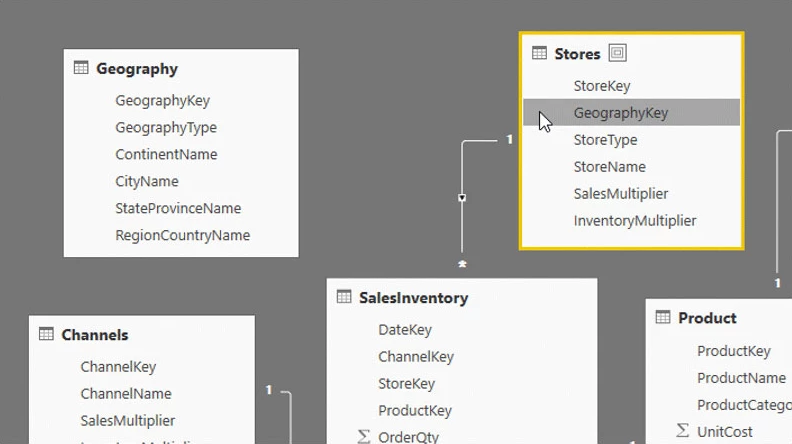
Creating multidimensional and reliable reports requires the integration of data from different systems. Power BI—as Microsoft’s analytics platform—enables such integration through a mechanism of relationships between tables. A properly designed data model then allows you to create valuable visualizations and analyses tailored to real business needs.
Thanks to the data modeling capabilities in Power BI, you can also define your own calculations and measures that help you analyze specific data segments, such as sales by region, product, or channel.
Why is data modeling crucial?
In modern organizations, data is scattered across multiple systems – from ERP, through CRM, to Excel spreadsheets. Without proper data modeling, it is difficult to obtain a coherent picture of the situation.
Data modeling in Power BI allows you to combine different sources into a single analytical structure, which provides a more comprehensive view of business processes. It is thanks to the data model that reports gain context and analyses become precise and valuable.
As a Microsoft partner, we help companies design data models in such a way that Power BI truly supports everyday business decisions—rather than being just another reporting tool.
Key data modeling features in Power BI
As part of data modeling in Power BI, you can:
- create relationships between data tables from different sources
- define your own measures and calculation columns
- filter and aggregate data according to business needs
- segment data by context (e.g. region, department, product)
- use DAX to create custom calculations
Also add an example of how it works in practice – e.g. combining data from Excel and the sales system (simplified, understandable).
Who will benefit from data modeling?
Data modeling in Power BI is not only used by IT specialists. The tool is designed for people who want to analyze data on their own without having to write code. It will be used by:
- department managers – gaining quick insight into key metrics
- analysts – creating advanced models and reports
- business users – combining data and drawing conclusions from ready-made visualizations
EBIS team support
EBIS is a team of experts in Power BI implementations and Business Intelligence solutions. For years, we have been helping companies model data and build reporting environments tailored to their real needs.
By working with us:
- you will receive support in creating a data model tailored to your sources
- you will build a transparent reporting structure
- you will integrate data from different systems and files
- you will gain training and documentation that will allow you to develop the environment yourself