



The Growing Role of CRM Systems in Sales and Marketing Management
CRM systems such as HubSpot now play a central role in processes including:
- lead and contact management
- monitoring sales stages
- planning and reporting sales activities
- analyzing marketing campaign effectiveness
The CRM becomes the operational heart of the organization. Problems arise when CRM data begins to be used for strategic reporting — without proper data modeling and transformation layers.
Limitations of Operational Reporting in CRM Systems
CRM reporting is operational by design. This means it:
- focuses on current activities
- does not include full financial context
- does not integrate data from other systems
- offers limited data modeling capabilities
For advanced analytics — such as customer profitability, historical pipeline analysis, or correlating marketing activities with revenue — an enterprise-class Business Intelligence tool like Microsoft Power BI is required.
HubSpot as a Data Source — Opportunities and Challenges
A CRM system such as HubSpot is one of the key sources of sales and marketing data within an organization. For Power BI HubSpot integration, it is crucial to understand what information available and what limitations stem from the system’s operational character is.
Scope of available data
HubSpot collects information across the entire customer lifecycle, including:
Contacts and Companies:
- identification data
- customer segmentation
- interaction history
Sales Opportunities (Deals):
- pipeline value
- sales stage
- expected close date
Sales Activities:
- meetings
- calls
- emails
- tasks
Marketing Campaigns:
- traffic sources
- campaign performance
- conversion metrics
Lead Sources:
- marketing channels
- paid campaigns
- organic traffic
- referrals
These datasets are of high analytical value, but issues arise when reporting remains confined within the CRM and does not involve broader data integration.
CRM Data Structure vs. Management Reporting Needs
CRM data structures are optimized for operational processes, meaning:
- focus on current record status
- lack of historical tracking by default
- limited relationships between objects
- no financial context (e.g., costs, margins, ERP revenue)
Meanwhile, management reporting requires:
- analyzing historical trends
- comparing performance across teams
- integrating CRM with financial systems
- building cross-functional KPIs (e.g., customer profitability, campaign ROI)
Therefore, Power BI HubSpot integration must include not only data extraction but also transformation and modeling.
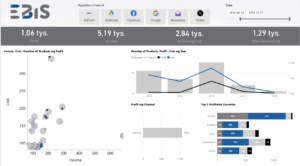
Power BI as the Microsoft Reporting Environment
In a Business Intelligence architecture, the reporting tool should serve as the central layer of data access. In the Microsoft ecosystem, this role is fulfilled by Microsoft Power BI. Connected to HubSpot, it enables scalable and consistent reporting.
Role of Power BI in Data Centralization and Visualization
Power BI enables:
- integration of data from multiple sources
- relational data modeling
- building measures and KPIs using DAX
- dashboard-based visualization
- 24/7 access to reports (desktop and mobile)
For Power BI HubSpot, the key advantage is the shift from operational to analytical and management-level reporting.
Integration Capabilities with HubSpot
HubSpot data can be integrated using several approaches:
API Connection:
- direct data extraction
- automated refresh
Pre‑built connectors:
- ready-to-use integration
- shorter implementation time
Data Warehouse Integration:
- centralization of multiple sources
- historical data storage
- higher scalability
The choice depends on the organization’s size, data volume, and reporting requirements.
The Importance of the Data Transformation Layer (Power Query)
Extracting data alone is not enough to ensure accurate analytics. A key step is data transformation using Power Query within Power BI.
This stage includes:
- data cleansing
- removing duplicates
- field standardization
- table merging
- preparing data for analytical modeling
Here, data consistency is ensured before it is made available to end users.
Data Model Development as the Foundation of Reliable Analytics
The data model determines reporting quality. In a Power BI HubSpot project, it is essential to:
- design relationships between tables
- separate facts from dimensions
- define business measures
- ensure consistent KPI definitions
A well‑structured model supports:
- historical trend analysis
- customer segmentation
- period-to-period comparisons
- reliable management reporting
Power BI HubSpot Integration — Project Approach
A successful Power BI HubSpot integration cannot be a simple technical connection of two systems. It is an analytical project requiring a structured approach, clear business goals, and proper data architecture.
Skipping the project phase often results in operational reports that fail to support decision-making and lack consistent KPIs.
Business Needs Analysis and KPI Definition
The first project phase involves determining:
- what decisions the reports should support
- which KPIs are essential for leadership
- what definitions of KPIs apply in the organization
- which data comes from CRM and which from other systems
This includes defining indicators such as:
- pipeline value
- actual revenue vs forecast
- conversion rates between funnel stages
- customer acquisition cost (CAC)
Clear KPI definitions eliminate interpretation discrepancies later on.
Identifying Key CRM Objects
HubSpot is based on core objects such as:
- contacts
- companies
- deals
- activities
- campaigns
The project must establish:
- which objects represent fact tables
- which serve as dimensions
- what relationships exist between them
- whether historical tracking is required
This step is crucial for building an accurate Power BI data model.
Designing the Relational Data Model
The model should:
- separate fact tables (e.g., deals) from dimension tables (e.g., customer, time, product)
- ensure clear relationships
- support historical analysis
- reduce data duplication
A properly designed model ensures scalability and correct DAX calculations.
Creating Measures and KPIs (DAX)
Analytical logic is built using DAX measures. In a Power BI HubSpot project, key measures include:
Pipeline Value:
- sum of active deals
- analysis by stage and owner
Conversion Rate:
- funnel stage progression
- lead → customer conversion
Sales Cycle Duration:
- average close time
- analysis by customer segment
Campaign Effectiveness:
- number of leads generated
- revenue attributed to campaigns
Correctly defined measures eliminate manual calculations and ensure consistent KPI definitions across the organization.
Testing and Data Validation
The final integration stage includes verifying:
- consistency with CRM source data
- accuracy of aggregations
- alignment of KPI definitions
- completeness of historical data
Validation involves comparing results with source reports and testing business scenarios. Only after this step should the report be released to users.
Extending Analytics — Integrating CRM Data with Other Systems
CRM reporting alone rarely provides a full business picture. Combining CRM data with other systems enables profitability analysis, marketing effectiveness assessment, and financial forecasting.
Therefore, Power BI HubSpot integration should be part of a broader data centralization strategy.
Combining HubSpot Data with Other Systems
CRM data can be integrated with:
ERP Systems:
- revenue
- costs
- margins
Financial Systems:
- invoices
- receivables
- project profitability
Marketing Automation Platforms:
- campaign costs
- traffic sources
- behavioral data
Excel Files:
- budgets
- forecasts
- operational data
This integration elevates reporting from operational to financial and strategic analytics.
Want to Organize Your CRM Reporting?
If your organization:
- uses HubSpot as its CRM
- reports data across inconsistent tools
- needs unified KPIs for leadership
- plans to expand its Business Intelligence environment
…it’s worth considering a data centralization project based on Power BI and Microsoft technologies.
Contact the EBIS team to analyze your current data environment and design a scalable analytics solution tailored to your company’s needs.